Reviews of some useful, FREE, photo related software.
Gimp | unix win mac
Free Photoshop
Replacement?
Virtually everyone
in the photography and design industry uses Photoshop, and sure, if you can
afford a copy yourself or have a copy of the cut down version “Photoshop
Elements” then go use it!. The Adobe Creative Cloud has helped make it affordable but it's still not cheap for hobby use! Photoshop is complicated to learn but it is
fair to say ‘the best’ and certainly the best supported and widest
used. If you want a simple-to-use interface then there is a myriad of other,
horrible (my opinion), image processing tools that can be downloaded or found
on the front of a magazine. I’m not going to waste my or your time here
reviewing ‘photo-magick-live-tool-wiz 5.0’ most of them are crap.
(If you are just learning then they are often fun to play with and learn by,
so go have fun until you grow out of them!)
If you want the meat but don’t want to fork out for Photoshop then I would heartily recommend gimp. The oddly titled gimp (GNU Image Manipulation Program) has been developed on the UNIX platform for many years (at least 10 years), and is a full featured professional quality image processing tool. It has for several years now also been available for Windows and MacOS.
What is GNU?
gimp is GNU, (you can go away and google about GNU licenses if you
want to read more) but this basically means it's freeware even for commercial
use. It is supported by a small army of enthusiastic freeware programmers, and
is well documented.
Gimp v Photoshop
Daily,
I’m a Photoshop user, but I have used gimp on Solaris (unix) where Photoshop
is simply not available, and found it to be very capable. Just like Photoshop
it is not easy to get straight into, it uses layers and tool pallets which to
the first time user are confusing and somewhat frustrating. There are some excellent
tutorials on using gimp available on the net. If you learn the gimp interface
then I think you will find a transition to PhotoShop (or vice-versa) fairly straightforward, or at least more so that using some other image editors.
It’s free, this surprises a lot of people, but it is free. There are no catches and unlike this site its not even ‘ad supported’. Its has no add pop-up clutter, nag screens, no spam, just image processing! View our video tutorial about gimp
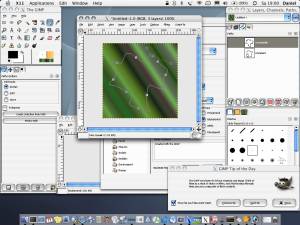
You can download gimp for free at gimp.org
Picasa | win mac unix
Catalogue
and Sort
One important feature of Adobe Photoshop and Creative Suite many people miss is the
Adobe Bridge, it is a very versatile 'centre point' from where you can orgsanise,
sort and catalogue not just your images but all of your files (specially those
from the rest of Adobe Creative Suite) there is, in fact there are many freeware
image cataloguing solutions available. you might (like me) prefer to sort your
own images into directories/folders, but some people swear by using a separate
piece of so called DAM (digital asset management) software, these range in cost
from free to thousands of dollars. Choose one that is suitable for you size
of collection (on this site we are talking about efficiently arranging a collection
of your images or web designs etc).
Google have come to the rescue for the hobbyist, in the shape of Picasa. It's allows you to tag, sort and lots of other cool stuff like creating montages from your images, You might think of it as 'media layer' or itunes' for your images. View our video tutorial about picasa
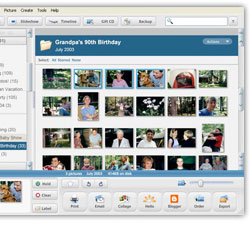
Download Picasa (from google)
Online Editors | web browser platform
This is software provided as a service (SaaS) that allows you to edit an image inside your browser window. The advantage here is that there is no software to install on your PC, now that most of us have fast internet connections uploading high resolution images to this kind of service is no longer a problem (some keep images locally on your machine so there is no upload at all).
pixlr.com
I think this one is my favourite, as well as a full featured image editor (with layers!) the site offers a suite of tools to do a range of quick, fun and automatic image processing. pixlr is one of several editors that attempts to emulate the feel of Photoshop making it a little bit harder to use for people who are not familiar with the Photoshop user interface. No sign up required.
sumo paint
Close runner up, I also like this one, but I'm biased as I edit images professionally and use Photoshop a lot - this is another editor that tries to bring "Photoshop to your browser window". No signup needed, a pro version is available that offers extra features and an offline version for editing where you have no internet connection.
fotor.com
fotor approaches online editing from a different angle, instead of trying to emulate Photoshop it contains a series of image editing and fixing tools which are more likely to suit quick fixes and casual editing - good for beginner! Again no sign up is required.
fotoflexer.com
More image editing aimed at beginners here, fixing, 'decorating' (stars and comic bangs, glitter text , borders etc.) all good stuff for the casual editor. Useful if you need to re-size, crop or otherwise enhance an image and you are working from a computer that has no decent image editor installed
More Articles and Ideas Like This :
Subscribe to read the latest tips, ideas and articles when they are published.
or check our updates page for the latest news, facebook posts and tweets